Configuration for address validation on Contact and Account within PwE
You can set up Address Configuration in PwE using Azure Maps.
Navigate to Configuration area.
Navigate to Address Configuration section.
Create a new ‘Address Validation’ record.
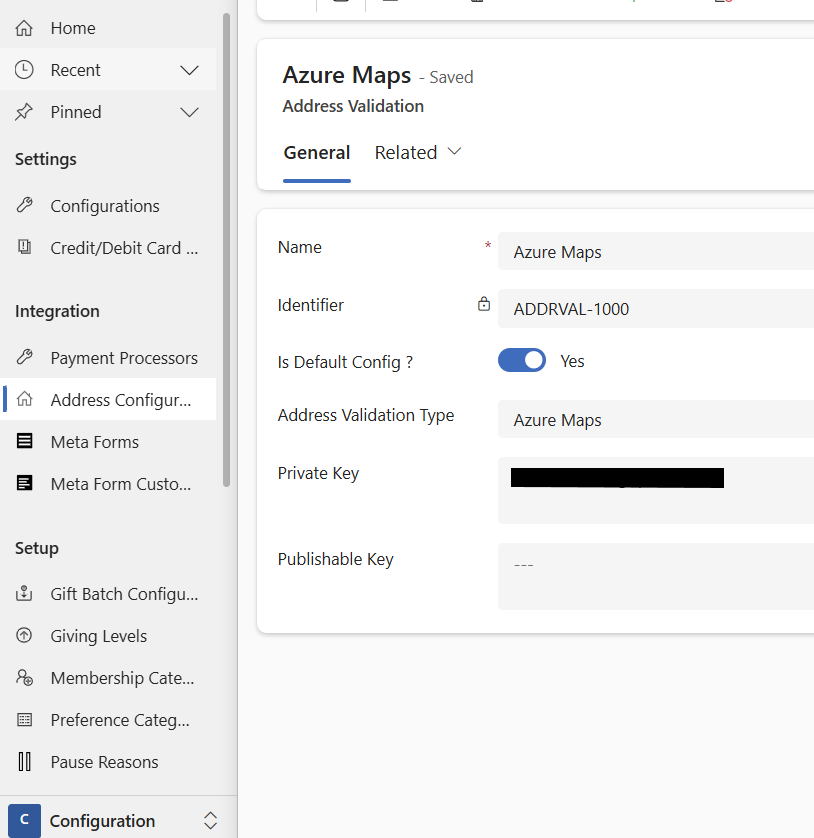
You can opt in for Address Validation feature for your organisation.
Navigate to Configuration, and open Default Configuration record.
Select ‘Address Configuration’ as per the “Address Validation” setup
.png)
Contact and Account address details and validation
Once the Address Configuration is setup, as per the steps above, you can search for a valid address for the Contact or Account record. PwE also allows for the manual entry of an address when the user toggles the “Is Manual Address” field to Yes.
.png)
.png)