vNudge supports the following notification channels.
Channel | Delivery method | User requirement |
|---|---|---|
Email delivered through Office 365 | The recipient must be a Dataverse system user with a valid email address or have a Secondary Email configured. | |
Microsoft Teams | One-to-one message delivered through the Flow bot | The recipient must be a Dataverse system user with a UPN or email address registered in Microsoft Teams. |
In-App | Notification displayed in the notification centre of a model-driven application | The recipient must be a Dataverse system user with access to the model-driven application. |
Note
The current release supports Dataverse system users as notification recipients. Contacts are not supported.
Microsoft Teams notifications are delivered as one-to-one messages. Teams channel posts and Adaptive Cards are not currently supported.
View Your Notifications
Open the vNudge application and navigate to Notifications to view notifications created for you.
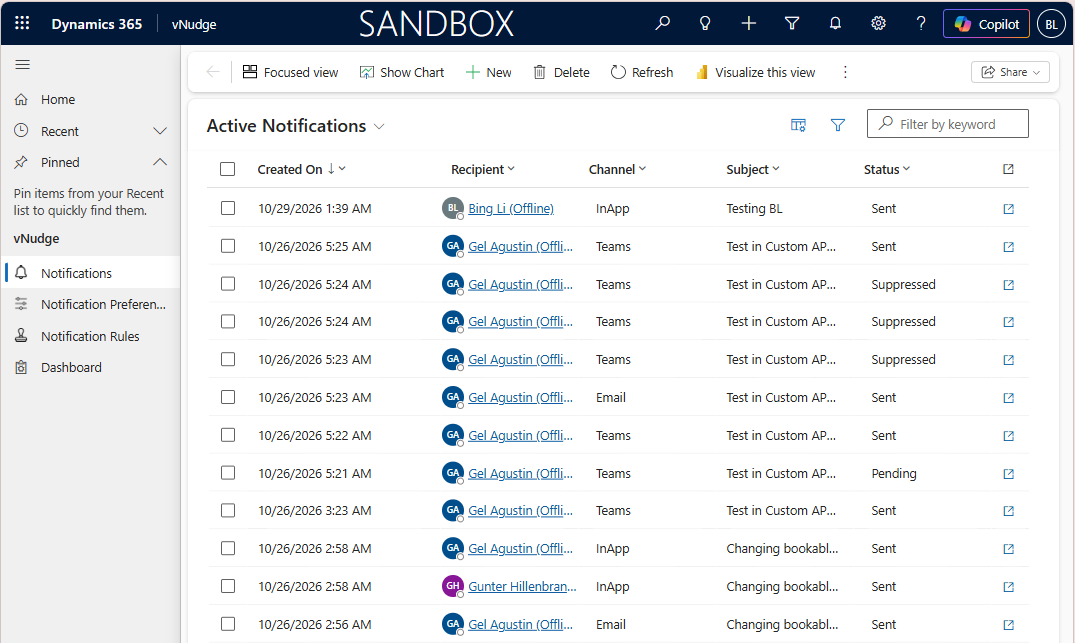
Each notification contains information about the message and its delivery status.
Notification Status
The notification status indicates where a notification is in the delivery process.
Status | Description |
|---|---|
Pending | The notification is waiting for delivery or is being retried. |
Sent | The notification was delivered successfully. |
Failed | Delivery failed after the available retries and fallback channels were exhausted. |
Suppressed | Delivery was skipped because the recipient enabled Mute All. |
Blocked | Delivery was prevented because the organisation's product licence was invalid when delivery was attempted. |
Notification Preferences
Notification Preferences allow users to control how vNudge delivers notifications when a delivery channel has not been explicitly specified.
Only an active Notification Preference is used when determining notification delivery.
If a user's Notification Preference is inactive, vNudge ignores the preference settings. An explicitly specified channel is used where one has been provided; otherwise, Email is used as the default channel.
For information about Preferred Channel, Channel Priority, Secondary Email, Mute All, and Max Retries, see Notification Preferences.