The PowerWorker Engage solution uses Appeals to track the success of your solicitations. Every Appeal belongs to a Campaign and can have multiple related Packages. An Appeal represents a delivery mechanism of solicitations within a Campaign. Events, email, and direct mail are typical ways you ask for donations.
The PowerWorker Engage solution uses the hierarchy of Campaigns, Appeals, and Packages to create reports and display summary data for fundraising, as depicted in the following image.
To work with Appeals, select Fundraising on the Change area menu. Then, under Manage Campaigns, select Appeals.
Create a new appeal
To create a new Appeal, add an Appeal record:
Select Fundraising from the Change area menu.
Under Manage Campaigns, select Appeals.
In the action pane, click on New.
Complete the fields in the General tab, and then click on Save on the action pane.
General tab
.png)
Appeal Name: Title for the new Appeal record.
Campaign: The parent Campaign for this appeal. Donations you collect via this Appeal in reports for the selected Campaign.
Estimated Revenue: Amount of funds you expect to generate through this Appeal.
Total Revenue: The total of transactions received for this Appeal.
Currency: A lookup field to choose the currency for this Appeal.
Reporting hierarchy tab
.png)
Package Name: This section displays a list of Packages linked to the Appeal. Use the arrow next to the header to reorder the list (up = ascending; down = descending).
Created On: Lists the date each Package record was created.
New Package: Opens the form to create a new Package linked to the Appeal.
Add Existing Package: Opens a pop-up window to search for Package records to link to the Appeal.
Performance tab
The Performance tab has two sections: Gift Performance and Event Performance.
Gift performance section
.png)
Field | Description |
$ Donations | Sum of all related donation (transaction) records that are completed. |
$ Pledges | Sum of all pledge (donor commitments) records that are active, completed or In progress and associated to that appeal. Calculates once everyday. |
Donations Collected | Count of all related donation (transaction) records that are completed. |
Pledges Collected | Count of all pledge (donor commitments) records that are active, completed or In progress and associated to that appeal. Calculates once everyday. |
Event performance section
.png)
Field | Description |
$Registrations | Sum of all related ticket registration records that are associated to all the events under the appeal. Calculates once everyday. |
$Sponsorships | Sum of all sponsorship records that are paid in full and associated to all the events under the appeal. Calculates once everyday. |
$Products | Sum of all purchased products records that are paid and associated to all the events under the appeal. Calculates once everyday. |
Registrations Sold | Count of all ticket registration records that are associated to all the events under the appeal. Calculates once everyday. |
Sponsorships Sold | Count of all sponsorship records that are paid in full and associated to all the events under the appeal. Calculates once everyday. |
Products Sold | Count of all purchased products records that are paid and associated to all the events under the appeal. Calculates once everyday. |
Administrative tab
Displays details on who created the Appeal, when it was created, when it was last changed and which user last updated it. It also displays the status of the Appeal (active/inactive) and reason, if applicable.
Related menu
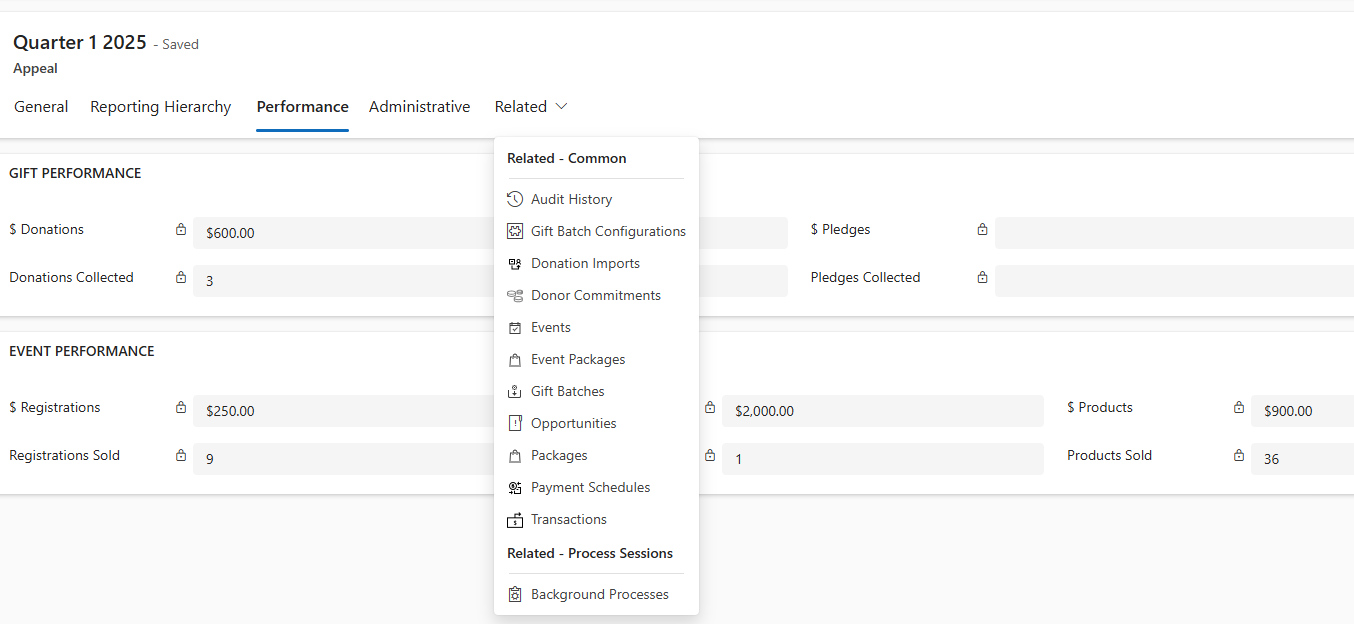
Field | Description | |
GIFT PERFORMANCE | $ Donations | Sum of all related donation (transaction) records that are completed. |
$ Pledges | Sum of all pledge (donor commitments) records that are active, completed or In progress and associated to that appeal. Calculates once everyday. | |
Donations Collected | Count of all related donation (transaction) records that are completed. | |
Pledges Collected | Count of all pledge (donor commitments) records that are active, completed or In progress and associated to that appeal. Calculates once everyday. | |
EVENT PERFORMANCE | Registrations | Sum of all related ticket registration records that are associated to all the events under the appeal. Calculates once everyday. |
Sponsorships | Sum of all sponsorship records that are paid in full and associated to all the events under the appeal. Calculates once everyday. | |
Products | Sum of all purchased products records that are paid and associated to all the events under the appeal. Calculates once everyday. | |
Registrations Sold | Count of all ticket registration records that are associated to all the events under the appeal. Calculates once everyday. | |
Sponsorships Sold | Count of all sponsorship records that are paid in full and associated to all the events under the appeal. Calculates once everyday. | |
Products Sold | Count of all purchased products records that are paid and associated to all the events under the appeal. Calculates once everyday. |
Contains links to records for fundraising activities that relate to the Appeal.