A notification rule must be activated first before begin monitoring the configured event.
A Notification Rule can have one of the following statuses:
Status | Description |
|---|---|
Draft | The rule has not yet been activated. |
Active | The rule is monitoring the configured Dataverse event. |
Inactive | The rule was previously activated but is not currently monitoring events. |
Activate a Rule
Before activating a rule, review its configuration and confirm that its recipients and notification content are correct.
To activate a rule:
Open the vNudge application.
Navigate to Notification Rules.
Open the Draft or Inactive rule.
Review the rule configuration.
Select Activate.
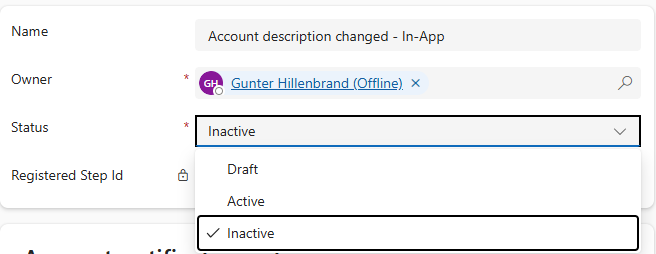
Confirm that the rule status changes to Active.
vNudge performs activation validation before the rule becomes Active.
If validation succeeds, the rule begins monitoring its configured Dataverse event.
If validation fails, the rule remains in its previous status:
A Draft rule remains Draft.
An Inactive rule remains Inactive.
The validation error is recorded against the Notification Rule.
Resolve an Activation Error
If a rule cannot be activated:
Review the validation error recorded against the rule.
Correct the reported configuration issue.
Save the rule.
Select Activate again.
Confirm that the rule status changes to Active.
Activation validates that:
The Target Entity exists.
Watched Attributes and condition fields exist on the Target Entity.
Subject and Body templates are not empty.
At least one recipient is configured.
Lookup recipient paths contain no more than two hops and resolve to a Dataverse system user.
The changed condition is not used with a Create-triggered rule.
Tip
Review the validation error before troubleshooting notification delivery. A rule that has not successfully activated is not monitoring its configured Dataverse event.
Deactivate a Rule
Deactivate a rule when it should stop monitoring Dataverse events or when its configuration needs to be changed.
To deactivate a rule:
Open Notification Rules.
Open the Active rule.
Select Deactivate.
Confirm that the rule status changes to Inactive.
After deactivation, the rule no longer responds to new Dataverse events.
Important
Deactivating a rule does not delete its configuration. The rule remains available and can be activated again later.
Edit an Active Rule
Configuration cannot be changed while a Notification Rule is Active.
To change an Active rule:
Deactivate the rule.
Update the required configuration.
Save your changes.
Review the updated configuration.
Activate the rule again.
When the rule is reactivated, vNudge performs the full activation validation again before returning the rule to Active.