Notification Rules allow administrators to automatically create notifications when defined events occur in Dataverse.
A Notification Rule defines what to monitor, when the rule should run, who should receive the notification, and what information the notification should contain.
Prerequisites
You require the vNudge - Admin security role to create and manage Notification Rules.
Create a Notification Rule
Open the vNudge application.
Navigate to Notification Rules.
Create a new Notification Rule.
New rules are created with a status of Draft.
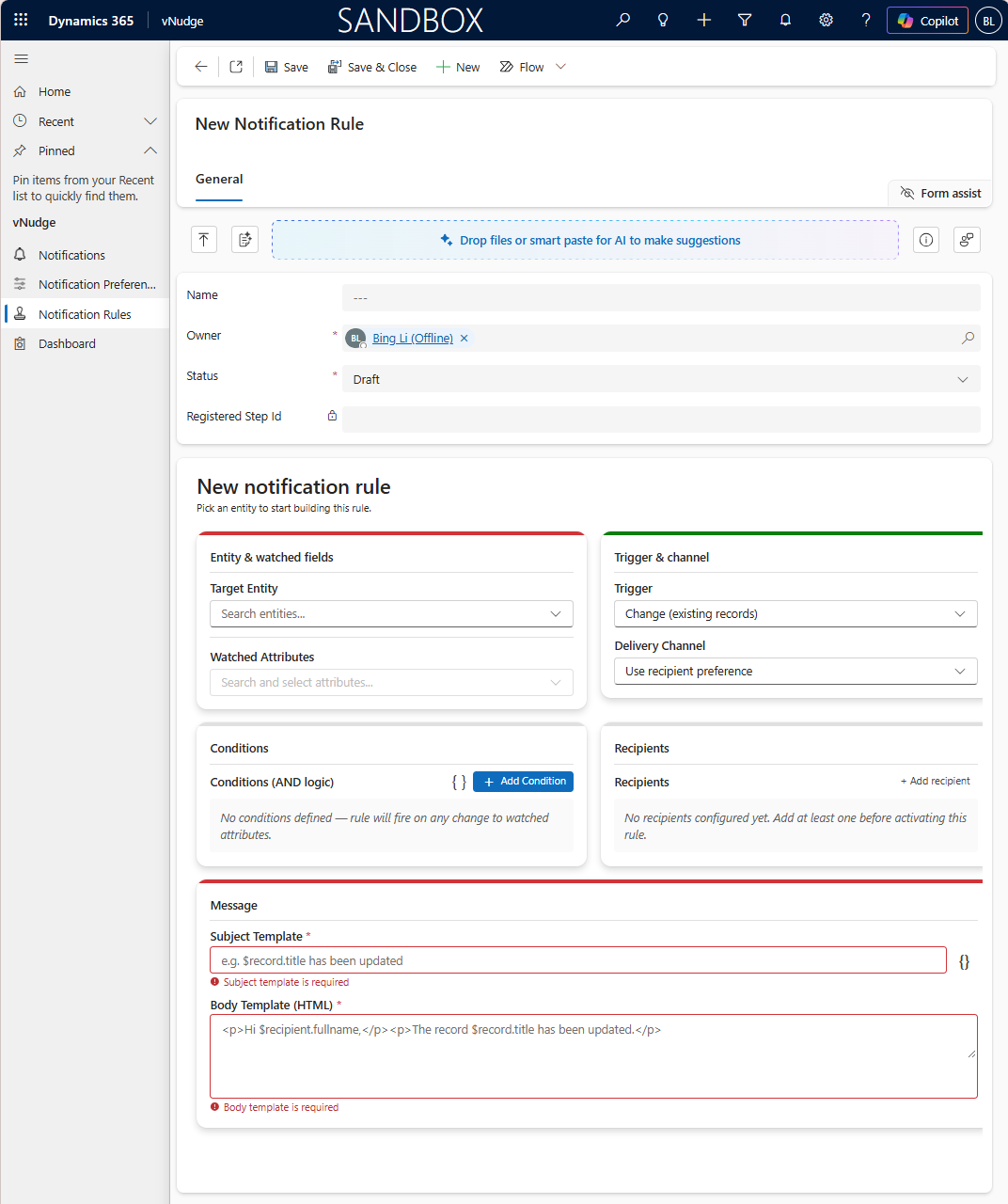
Under Entity & watched fields, select the Target Entity that you want the rule to monitor.
Select the required Watched Attributes.
Watched Attributes identify the fields that vNudge monitors for the Notification Rule.
Under Trigger & channel, select a Trigger Type.
Trigger Type | Description |
|---|---|
Create | Evaluates the rule when a new record is created. |
Change | Evaluates the rule when a watched attribute changes. |
Important
For a Change rule, select at least one Watched Attribute. The rule is evaluated when one or more of the selected attributes changes.
Select a Delivery Channel if notifications generated by the rule must use a specific delivery channel.
Select Use recipient preference if the recipient's active Notification Preference should determine how the notification is delivered. If the recipient does not have an active Notification Preference and no specific delivery channel is provided, vNudge uses Email.
Under Conditions, add any conditions required to further control when the rule generates notifications.
Conditions use AND logic. When multiple conditions are configured, all conditions must be satisfied for the rule to proceed.
Under Recipients, add one or more recipients.
Recipient Type | Description |
|---|---|
Static | Sends the notification to a specific Dataverse system user. |
Lookup | Determines the recipient using information from the record that triggered the rule. |
Use a Static recipient when the same user should always receive the notification.
Use a Lookup recipient when the recipient depends on the record that triggered the rule. For example, the recipient could be the owner of the record.
Lookup recipient paths can contain up to two lookup hops and must ultimately resolve to a Dataverse system user.
Important
Notification recipients must be Dataverse system users. If none of the configured Lookup recipients resolves to a system user, vNudge skips the rule and no notification is created.
Under Message, enter the notification Subject Template and Body Template.
Notification content can include supported values from:
The Dataverse record that triggered the rule.
The resolved recipient's user record.
Use the token insertion functionality in the Rule Editor to add supported values to the Subject or Body.
Save the Notification Rule.
Review the rule configuration.
When the rule is ready to use, activate the rule.
A rule that has not successfully activated is not monitoring its configured Dataverse event.