What Is It?
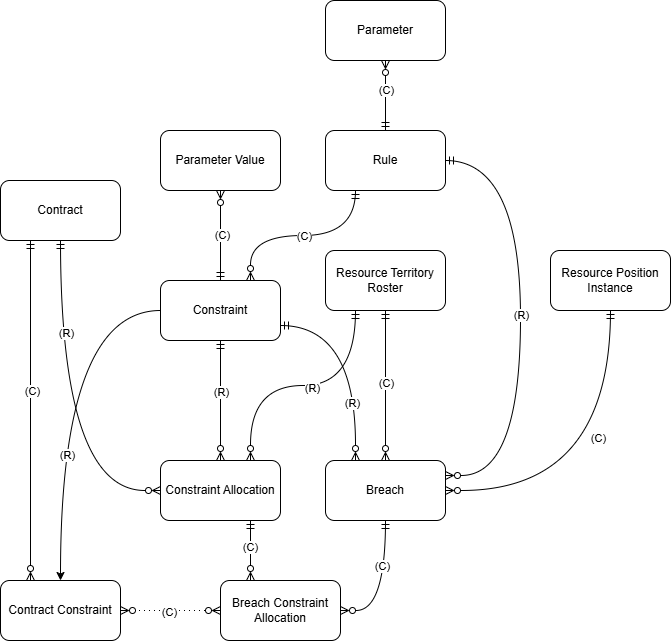
Compliance Delete Behaviors define what happens when you delete records that are part of compliance rules, constraints, and breaches. The goal is to keep data consistent and prevent orphaned records.
How Does It Work?
Immediate Actions
Some compliance records are deleted straight away (e.g., Parameter Values).
Some compliance record deletes cascade to delete child records (e.g., deleting a Rule also deletes its Parameters).
Restricted Deletes
Some compliance records will not allow the delete if the record has critical dependencies (e.g., Constraint Allocations).
Async Engine
Handles clean-up tasks like removing Breaches that no longer have valid links.
Runs in the background asynchronously and retries if errors occur.
Delete Behaviors
The table below defines the result of each action by the user in the system.
Action - User action
Result - System action
Action | Result |
Delete Parameter | Delete Parameter |
Delete Compliance Rule | Error is displayed if:
Delete the following entities:
|
Delete Parameter Value | Delete Parameter Value |
Delete Constraint | Error is displayed if:
Delete the following entities:
|
Delete Resource Position Instance | Delete the following entities:
|
Delete Roster | Error is displayed if:
Delete the following entities:
|
Delete Resource | Error is displayed if:
Delete the following entities:
|
Delete Territory | Error is displayed if:
Delete the following entities:
|
Delete Contract | Error is displayed if:
Delete the following entities:
|
Delete Contract Constraint | Delete the following entities:
|
Delete Constraint Allocation | Delete the following entities:
|
Delete Breach Constraint Allocation | Delete the following entities:
|
Delete Breach | Delete the following entities:
|